

If you’re reading this blog post, you’re probably either researching how to start a blog or you have taken the plunge already and need a little guidance. Before I created Sistabliss Tribe, I really didn’t possess much knowledge about blogging or building a website, but I did have a passion for writing and sharing wellbeing tips. Two years later, i’m still learning, but I’m a hell of a lot wiser.
In this blog post, I share with you my 10 top tips for how to start a blog. My must-read, ‘wish I had known sooner’ golden nuggets of wisdom, which could save you from wasting time and money in the long run, and kickstart your blogging journey.
*Disclosure: This post contains affiliate links and I receive a commission if you visit a link and buy something on my recommendation. Purchasing via an affiliate link doesn’t cost you any extra. All opinions are my own. For more details see my disclosure policy and privacy policy.*
1. Self-host your blog
When I first started blogging, I really had no idea what I was doing. I can’t count how many times I typed ‘ how to start a blog’ into Google looking for guidance. Sistabliss Tribe is actually my third blog, but this blog has still been a massive learning curve and journey of discovery for me. I initially created my blog on WordPress.com, because that’s all I knew. After joining some Facebook Groups for bloggers, I quickly discovered the world of WordPress.org – which is an open source platform upon which you can self-host your website. Now I won’t get into the technicalities, because honestly that’s not my forte.
For the full pro’s and cons of WordPress.com v WordPress.org, check out this WP Beginner’s article.
To self-host your website on WordPress.org, all you need is a domain and a hosting provider. There are hundreds of providers out there, but be careful. They vary hugely in price and quality of service – and expensive definitely does not mean better! When I moved to self-hosted, I initially purchased my domains and hosted through FastHosts. There was nothing particularly wrong with them that I knew (although a professional might disagree) but there was also nothing particularly great about them. The customer service was impersonal and often unhelpful.
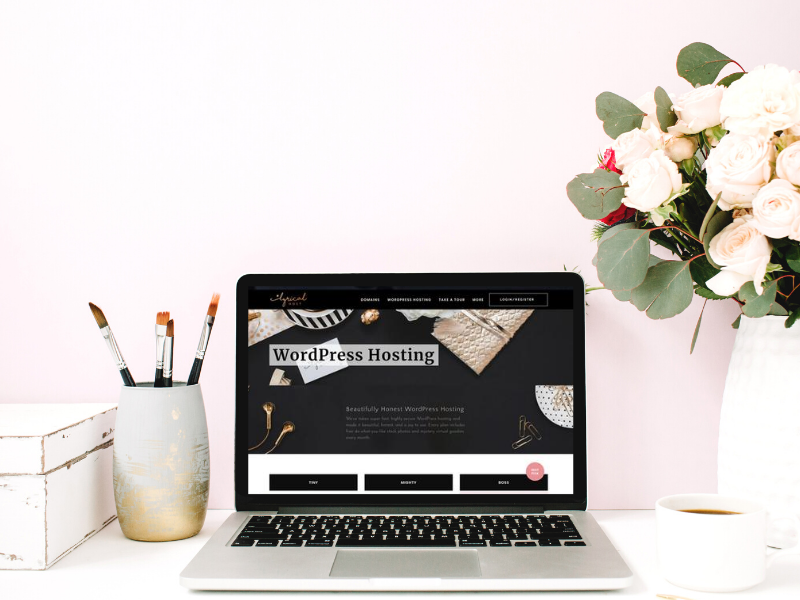
A new friend then recommended Lyrical Host to me, and after thorough research I moved my domains and hosting – Lyrical Host are fantastic and every new bloggers best friend.
For a deep dive into Lyrical Host‘s features and a step by step guide explaining how to start a blog with Lyrical host, read my blog post How To Start A Blog Stress-Free With Lyrical Host. Use code SISTABLISS10 at checkout for 10% off hosting plans which start at just £9.99 a month.
2. Choose your theme wisely
In the 2 years I’ve been blogging as Sistabliss Tribe, i’ve had three themes. The first was a very basic and free theme unique to WordPress.com, where I started. The second was also a free theme, which I moved to when I went self-hosted and could no longer use my original theme.
My third and current theme, I purchased from 17th Avenue Designs. I’m so impressed by not only it’s beautiful design (I hope you agree!) but also the level of features and the detailed implementation instructions which come with every theme. I wish I has known about their themes and invested in my blog from day one.
When choosing a theme, it’s really important to thoroughly consider what features you need, what layout you would like and how much freedom to customise you’d prefer. Research is key, including viewing other blogs you like and comparing different themes.
The Harper Theme (which I use) currently costs $69 (as of 21/03/2021) which converts to £49.84. Considering this is a major part of any blog, their stunning themes are incredibly good value. This theme comes with really useful features, such as ‘shop with me’ widgets, an instagram landing page and email subscription fields. All really useful ways to grow your following and monetise your blog.
3. You need Canva
Canva is like a bloggers ultimate sidekick. It’s graphic design for beginners, with thousands of templates, images and design elements to create all the assets you need for your blog. From Pinterest pins and social media graphics, to your media kits and digital guides you might create for giveaways.
The best part, Canva has a free plan which it great for getting started. I quickly opted for the paid subscription, which gives access to thousands more photos and elements but also awesome additional features like the resizing tool. For me, these extras save me so much time and highly improve my blog and social content.
Sign up to Canva with a free forever plan, or try Canva Pro with a free 30 day trial. After the trial, Canva Pro costs £10.99 a month (as of 21/03/2021).
4. Enrol in a Pinterest course
One of the best things I ever did was enrol in an online Pinterest course. Pinterest can be a fantastic source of traffic for bloggers, all you need is the right knowledge and time each week to dedicate to it.
I can’t recommend this course by Ell Duclos (AKA Boss Girl Bloggers) enough. Sign up to the Pinterest with Ell course and have unlimited access, which is regularly updated as Pinterest change their algorithms. I wish I had just done this to start with, instead of stumbling my way through Google for advice for the first few months (where you often find conflicting and outdated information).
The Pinterest with Ell course is currently $46.80 (as of 21/03/2021) which converts to £33.80 – incredible value for the amount of information you receive which you just can’t find free on Google.
5. Know your data protection responsibilities
Data protection might not be a very magical part of blogging, but it’s essential. If your website is collecting personal data, including using cookies, you must have a privacy policy (also called a privacy notice) on your website. This sets out how you use personal data and what rights the data subject (the person whose data you are collecting) has. It must be easily accessible and compliant with relevant legislation. For example, if EU citizens can visit your site, then you must comply with the General Data Protection Regulation. The Information Commissioners Office website is a great resource for UK bloggers. I highly recommend researching your data protection responsibilities so you can be sure you’re following best practice. Not only will this prevent you getting into trouble in the future, it builds much-needed trust with your visitors.
6. Launch an email subscriber list
As soon as your blog is ready to start taking email subscribers, it’s time to sign up to software and build your list. There are lots of great choices out there, with different offerings, many with free packages. A popular choice is Mailchimp, which i’ve used for years through my job, but for my blog I preferred something simpler and easily customisable. I therefore have a free plan with Mailerlite, which allows up to 1,000 subscribers and 12,000 emails per month. I love the easy template builder, great for creating simple custom designs to compliment your branding.
Before starting, be sure to familiarise yourself with relevant email marketing law, such as the Privacy and Electronic Communications Regulation.
6. Schedule social content
Social media is a useful tool to promote your blog posts. Of course scheduling in advance is optional, but if like me, you blog around a full-time job, it’s tricky to post on social media regularly throughout the week without the help of a scheduling app. Hootsuite is a popular one, with free plans for up to 3 social media accounts. I love Planoly (again, free plans available) for scheduling instagram posts, as you can plan our your grid, great if you are going for a particular aesthetic.
Pinterest scheduling is a well discussed topic. Many bloggers use Tailwind, a paid for service for scheduling pins, and get great results. Pinterest have said however they prioritise pins scheduled directly through their own scheduler, which I use. The downside with Pinterest’s built in scheduler is you can only schedule pins for the next two weeks.
As a side note, I recommend regularly reviewing your social platforms to assess how you can improve them, even if that’s dropping one to prioritise another. After 2 years, I found my Facebook wasn’t receiving much engagement, so I stopped wasting time posting content there, and dedicated more time to Twitter, where I quickly saw an increase in engagement.
8. Plan your content
I like to take a loose approach to planning my content, because blogging is a creative outlet for me. There are however still two things I like to do. Firstly, I keep a list of blog post topics and title ideas to hand which I constantly add too. On this list will be popular topics on Pinterest or social media, popular questions I could answer with a blog post, or topics I believe I have expertise to share. I also look at key dates throughout the year relevant to my blog, and plan appropriate content around those dates. There are the obvious holidays, like Christmas, Valentines and Easter. It’s also important not to forget notable days throughout the year, for example, International Women’s Day and World Book Day, or first day of spring or summer.
I use Trello to plan my content, and everything to do with my blog actually! A simple tool to use online or on your phone to keep all your ideas and set tasks for yourself.
9. Join affiliate programs at the right time
If you wish to make money from blogging, it is often tempting to join loads of affiliate programs as soon as you start but it’s important to have a strategy. Firstly some platforms give you a limited window to make a number of qualifying sales before granting you a permanent place on their program (such as Amazon Associates). So you want to wait to sign up until you have started producing appropriate content, built up a rapport and trust with readers and have decent traffic. For example, I was approved for Amazon Associates after I’d hit 2000 monthly visitors due to achieving 3 approved sales. I had actually signed up previously when I first launched my blog, and unsurprisingly was booted off the program after 3 months of no sales. Luckily I could reapply, but had to change all my existing links to reflect my new Amazon Associates ID.
Secondly it’s great to research programmes thoroughly first to determine if they are suitable for the types of products or services you want to promote. Many programs set a minimum income before they will pay out, so for a smaller blog it may benefit you to stick to promoting just a small number of programs, rather than spreading your links across multiple that do the same thing. I tend to stick to RewardStyle and Amazon Affiliate, which together cover most brands and products I recommend.
10. Find your tribe
The blogging world is an incredibly supportive world to be in. There are a number of groups on Facebook you can join, where thousands of bloggers ask questions and share their lessons and top tips. Two of my favourite Facebook groups for learning how to start a blog are Boss Girl Bloggers and Becoming A Blogger. 9 times out of 10, your question will already have been asked within the groups and generated many helpful answers, so search before posting.
I hope you found this blog post full of tips on how to start a blog useful, and if you have any questions about the tips in this post feel free to get in touch via social media or the comments below. Don’t forget to subscribe to my mailing list, and follow Sistabliss Tribe on Instagram, Pinterest and Twitter.
Stay safe out there, Rosie Louise x




I have been blogging for about two and a half years now but still found some really useful thoughts in this post. Plus things I definitely wish I knew back when I started writing. Pretty much all I knew about blogs then was that you wrote stuff and they were online!
So glad you found it useful! It’s amazing how much you learn in those first couple of years isn’t it. Rosie x
Great tips! I’ve been blogging on and off for the last six years however it’s only in the last year where I’ve really taken it seriously (from a business type of view). One of the things on my to do list at the moment is to create a mailing list! That’s the next thing for me to crack! Lovely tips chick & so easy to read!!
Claire.X
http://www.clairemac.co.uk
Thanks for your comment Claire, so please you liked the post. Good luck with the email list, it’s one of those things that takes a little time to set up but then super easy to manage and really beneficial. Rosie x
Such a brilliant post with lots of helpful tips especially for newbie bloggers. Thank you for sharing all your best tips – Canva is a life saver x
Thanks Della. Canva really is the best! Rosie x
These are all excellent tips! Blogging has been so fun and I’m loving it so far. Been about 6 months almost for me now! I’m excited to monetize soon. Thanks for sharing xx
Lynn | https://www.lynnmumbingmejia.com
Thank you Lynn. So great you are enjoying blogging!